Showing posts with label OUTPUT. Show all posts

Saturday, 7 March 2015

ADDING IMAGES,COLOR, AND BACKGROUNDS. Input

<a href = “replacing. Html”> <img src =”next. Gif” alt =”net”/> </a>

<href=” ready. Html”> <img src =”back. Gif” alt =”back” /> </a>

<a href = “index. Html”> <img scr =”up-arrow. Gif” alt =”up” /> </a>

Figure 7.15 shows the result of this addition
.
When you click the icons now, the browser jumps to the linked page just as it would have if you had used text links.

OUTPUT


FIGURE 7.15 THE BASIC PAGE WITH ICONIC LINKS.


Speaking of text, are the icons usable enough as they are? How about; adding some text describing exactly what’s on the other side of each link? You can add this text inside or outside the anchor, depending on whether you want the text to be a hot spot for the link as well. Here, include it outside the link so that only the icon also can align the bottoms of the text and the icons using the align attribute of the <img> tag. Finally, because the extra text causes the icons to move onto two lines, arrange each one on its online instead: 

ADDING IMAGES, COLOR,AND BACKGROUNDS OUTPUT

 At the bottom of the page, add your images using <img> tags:

INPUT

<img src =”next.gif” alt =”Next” />

<img src =”next.gif” alt =”back” />

<Img src =”up-arrow. Gif” alt =”up” />

OUTPUT FIGURE 7.13 THE BASIC PAGE, WITH NO ICONS.


Figure 7.14 shows the result.
OUTPUT FIGURE 7.14 THE BASIS PAGE WITH ICONS.

Sunday, 15 February 2015

NOTE

 text-based browsers, such as lynx and those associated with wireless devices, can’t render bold, italic, or other styled text. They generally highlight the text in some way, but the method varies depending on the browser and platform.

You can nest character tags-for example, using both bold and italic for a set of characters-as follows:
<b><i>text that is both bold and italic</i></b>
However, the result on the screen is browser-dependent, like all HTML tags. You weren’t necessarily end up with text that’s both bold and italic. You mi9ght end up with one style or the other:

INPUT
<p>in Dante’s  <i> inferno<i> Malaboge was the eighth circle of hell, and held the malicious and fraudulent. </p>

<p> all entries must be received by <b> September 26, 1999</b>. </p>

<p> type <tt>lpr- pbirch my file. Text</text</tt>to print that file.</p>

<p>sign your name in the spot marked <u>sign here</u>:,/p>

<p>RCKP floor mats give you <big> big</big> savings over the competition!<p>

<p> then, from the corner of the room, he chard a <small> tinny voice </small>,.</p>

<p> in heavy trading today. Consolidated orange trucking rose <sup>1</sup>/<sup>4</p>
Points on  volume of 1,457, 900 shares. </p>
Figure 6.2 shows some of the physical tags and how they appear.

OUTPUT


FIGURE 6.2 physical styles displayed in a browser.
CHARACTER FORMATTING USING CSS

Wednesday, 11 February 2015

INPUT

INPUT
<u1>
<1i><i> the rainbow returns</i> by E. smith</1i>
<1i><i>seven steps to immeasurable wealth</i> by R.U. needy </1i>
<1i><i> the food-Lovers guide to weight loss</i>by K\L. Goode</1i>
<1i><i>the silly person’s Guide to seriousness </i>by M. Nott</1i>
</u1>
</body>
</html>
OUTPUT
FIGURE 5.8 a list of books.


Now, modify each of the list items so that they include link tags. You’ll need to keep the <1i> tag in there because it indicates where the list items begin. Just add the <a> tags around the text itself. Here you’ll need to keep the <1i> tag in there because it indicates where the list items begin. Just add the <a> tags around the text itself. Here you’ll link to filenames on the local disk in the same directory as this file, with ea h individual file containing the review for the particular book:

Sunday, 8 February 2015

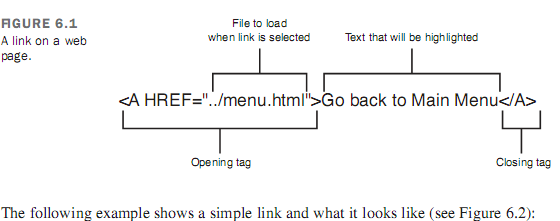
FIGURE 5.1 a link on a web page.

FIGURE 5.1 a link on a web page.

                                         
The following example shows a simple link and what it looks like (se figure 5.2).
INPUT
Go back to <a href=”menu, html”>menu menu  </a>
OUTPUT
How a browser displays a link.
Now you can try a simple example with two HTML pages on your local disk. You’ll need your text editor and your web browser for this exercise. Because both the pages you’ll work with are on your local  disk, you don’t need to be connected to the internet. (be patient; you’ll get to do network stuff in the next section.

Friday, 6 February 2015

CAUTION

 Don’t use headings to display text in boldface type or to make   certain parts of your page stand out more. Although the result might look cool in your browser, you don’t know what it’ll look like when other people use their browsers to read your page. Other browsers might number headings or format them in a manner that you don’t expect.
Tools to create searchable indexes of web pages might extract your headings to indicate the important parts of a page. By using headings for something other than an actual heading, you might be foiling those search programs and creating strange results.
INPUT
<h1>mythology through the ages </h1>
<h2>common mythological themes</h2>
<h2> earliest known myths</h2>
<h3>origins of mythology</h2>
<h3>Mesopotamian mythology</h3>
<h3>Egyptian mythology</h3>
<h4>the story of Isis and 0siris</h4>
<h4f>Horus and set: the battle of good vs. evil</h4>
<h4>the twelve hour of the underworld</h4>
<h4>the river Styx</h4>
<h2>history in myth</h2>
OUTPUT